Showing posts with label Working Agreements. Show all posts

Sunday, October 3, 2021

Five reasons for having a Definition of Done

"Do we really need to waste our time to come up with a Definition of Done?"  - well: of course, you're free to do that or not. Just give me your attention for a few minutes to consider the multiple benefits you gain from having one.


Before we start
Many people use the term "Done" in reference to their share of the work, as in, "I am done." This leads to multiple, oftentimes inconsistent, definitions of "development done," - "testing done," - "deployment done." While this may be a choice the team makes, customers don't care who specifically is done with their own work. They care when they receive a product - hence:
The Definition of Done is not set for specific phases of the working process
- it refers to product increments that have passed all stages of the team's process.
As such, it encompasses all the usual activities related to an organization's development process and applies to every single product backlog item.

Now - what does a Definition of Done offer?

#1 - A Quality Standard

"But I thought you had performance tested it?" - "No, a performance test was not part of the acceptance criteria!" - "It's obvious that with that kind of performance, the feature is entirely unusable!" - "Then you should have requested us to performance test it!"

Well - in such a conversation, nobody is a winner: the customer is dissatisfied because they don't get what they need, developers are dissatisfied because they just got an extra load of work, and the Product Owner is dissatisfied because they ended up getting no deliverable value.

The Definition of Done aligns stakeholder expectations on product quality.

Should the customer be bothered to re-confirm their quality expectations on every single user story, and should they be required to re-state that this expectation applies for every release? No.

Once everyone is clear that something is a universal quality requirement, adding a simple statement like, "all pages load within less than a second," would make it clear that the team's work isn't done until the customer's demand is satisfied.


#2 - Common understanding

"I'm done." - "When can I have it?" - "Well, I still need to commit it, then we'll produce a build package, then it goes to testing, let's see where it goes from there ..." - "But didn't you say you were done?" - "I'm done with development."

When different people have different mental models of what "done" means, everyone uses the term in the way that is most convenient for them.

The Definition of Done defines how the term, "Done" is used in the organization.

So much organizational waste - from extended meetings, over people trying to do things that can't possibly succeed, all the way to massive management escalations, is attributed toward misaligned use of this short, simple word: "Done."


#3 - Simpler communication

"I'm done." - "Did you do any necessary refactorings?" - "Will do later." - "If it's not refactored, you can't commit it! And did you get your code reviewed?" - "Do I really need to?" - "That's part of our policy. Where are your unit tests?" - "I don't think that module needs tests." - "Dude, without tests, it's un-maintainable! And did you check with the testers yet?" - "Why should I?" - "What if they found any problems?" --- "Sorry to disturb: I saw that the feature is marked as Done. Can I use it yet?" - "Almost." - "No!" - "Okay, I'm confused now, I'll set up a meeting later so you can explain the status to me."

When everyone understands what needs to be done to be "Done" (pun intended) - communication is much simpler - long, deep probing to discover the actual condition of an individual work item become un-necessary.

The Definition of Done simplifies conversations.

Everyone should be clear what it means when someone uses the term "Done" - what must be understood, and what can be understood.

Everyone must understand, "When it's not covered by the DoD - you can't expect that someone did it, especially when it wasn't explicitly agreed beforehand."

Likewise, everyone can understand, "When it is covered by the DoD - you don't need to ask whether someone did it when people say it was done."


#4 - Providing clarity

"I need an online shop." - "No problem." - "Can you store the orders in the database?" - "We know how to do our job!" - "Can you make sure that baskets don't get lost when users close the browser?" - "That makes it much more complicated. How about we do a basic version now, and we'll add basket session persistence later on once you have a solid user base?" - "Can you make sure the shop has good performance?" - "What do you mean, 'good performance?'"

Stakeholders are often unaware what the team normally does or doesn't do and what they can definitely expect from the product. Hence, they may communicate incomplete or overspecific requirements to the team, both of which are problematic.

Incomplete requirements lead to low-value products that lack essential features, oftentimes leading both parties to conclude that the other party is an idiot.

Overly specific requirements, on the other hand, usually lead to sub-optimal implementations and waste effort when there are easier, better ways to meet user expectations than specified by the customer.

The Definition of Done avoids over-specification on items covered in the DoD.
It likewise avoids under-specification for points not covered in the DoD.

Within the confines of the Definition of Done, the team gains freedom what to do and how to do things, as long as all aspects of the DoD are met. It allows customers to keep out of details that the team handles within the standards of their professional ethics.


#5 - Preventing spillover work

"We're done on this feature." - "Splendid. Did you do functional testing?" - "Yup." - "And?" - "3 defects." - "Are they fixed yet?" - "If we'd do that, we'd not meet the timeline, so we deferred them until after the Release." - "But ... doesn't that mean you still have work to do?" - "Not on the feature. Only on the defects." - "But don't defects mean the Acceptance Criteria aren't met?" - "The defects are so minor that they can be fixed later ..."

We see this happening in many organizations.  Unfortunately, there are two insidious problems here:

1. Based on the Pareto principle, the costs of the undone work could massively outweigh the cost of the done work, potentially toppling the product's entire business case. And nobody knows.

2. Forecasting future work is a challenge when capacity is drained in an ill-defined manner. The resulting loss of transparency decreases customer trust and generates stress within the team.

The Definition of Done ensures that there is no future work induced by past work.

The Definition of Done is a protection for the team, in that they will not accumulate a constantly rising pile of undone work which will eventually incapacitate them.

Likewise, a solid DoD protects the business, because there is a much lower risk that one day, developers will have to state that, "We can't deliver any further value until we invest a massive amount of time and money to clear our debt."


Summary

The reasons for having a Definition of Done may vary from team to team, and each person might find a different reason compelling. While it's definitely within the realm of possibility that none of the benefits outlined in this article are meaningful in your context, at least ponder whether the hour-or-two it takes to align on the key points of a Definition of Done are worthwhile the amount of stress you might have to indulge by not having one.

A Definition of Done is not cast in stone - it's up to negotiation, and points can be added and removed during Inspection and Adaptation events, such as team Retrospectives. As long as everyone can agree to a change, that change is legitimate.

If you don't have a DoD yet, try with a very simple one and take it from there.

As a conclusion of this article, I'll even throw in my favorite minified DoD:

No work remaining.

Wednesday, July 21, 2021

Definition of Done vs. Acceptance Criteria

Let's clear up a very common confusion: What's the difference between "Acceptance Criteria" and the Definition of Done, and which is which?


Sometimes, people ask "what is the Definition of Done for this User Story?"
And then, they proceed to document a feature's Acceptance Criteria like this:
  1. Feature works
  2. All tests passed
  3. Documentation written
To make it short: in this example, AC's and DoD are backwards. Now, let's clarify.


Acceptance Criteria

A backlog item's Acceptance Criteria are stated from the perspective of the item's consumer: what defines, for them, that the item is successful?
I hesitate to say, "user acceptance", because sometimes, backlog items are not intended for the end user. If we ignore that case, though, the Acceptance Criteria could be written like simplified User Acceptance Tests: verifiable statements that can be answered with "yes" or "no", and tested by examining the product itself.

Good Acceptance Criteria would be, for example:
  • I get informed about my current balance
  • I get a warning when my balance is negative
  • I get a notification when my balance has changed
As you see, Acceptance Criteria are things that the product does when the item is completed. They are not things that the development team does to the product.


Definition of Done

The Definition of Done is, as the term says, a definition, of what everyone in the development organization, the Product Owner, as well as stakeholders, should understand, when someone uses the term, "Done." 
The Definition of Done is a set of mandatory activities that apply to every single backlog item. It's a checklist-style itemization of things that the team does to the product in order to call a single backlog item "Done."

An example of a Definition of Done is,
  • Code written
  • All tests Passed
  • Successful deployment to Test environment
  • Mandatory documentation completed
When you have such a definition, it does not make sense to add these points again to every single backlog item.


But ... the DoD doesn't apply to this item!

Well, it's entirely feasible that the amount of effort to complete a specific DoD activity on an item is Zero. That means it's by default "Done", because all the work required is completed with zero work.
Another thing is when you specifically want to make an exception from your DoD for a specific item. Well, as long as it's an exception, you understand and accept the consequences, and everyone including the customers agrees to take this route, that's okay, because transparency is there.
Although I would caution that if it happens too often, you may want to check whether your DoD makes sense.

But ... it's a specific task for this item!

That's okay. Then add it that task to the item. It's still not an Acceptance Criterion, and it doesn't affect the applicability of the overall Definition of Done.


Discerning: AC or DoD?

  Acceptance Criteria   Definition of Done
Describes ...   What the product does   What the team does
Quality of ...   Product from user perspective   Work from process perspective
Applies to ...   Specifically this backlog item   Generally all backlog items
Met when ...   Verified by a test   Agreed inside team

Wednesday, February 8, 2017

Choosing an adequate sprint length

New Scrum teams must answer the question: "What sprint length should we choose?" Being inexperienced in Scrum, beginners often address that question to me. I have an opinion - which does not matter in itself. Let me give you the reasons why I have formed my opinion:


I advise new teams to start with 1 week sprints, because:


  1. You from new habits quicker when you have the ceremonies every week.
  2. You learn to deliver smaller batches when you MUST get some thing done within a week.
  3. The ceremonies are shorter and feel less invasive.
  4. You'll do more experimentation with the process.
  5. You get faster learning cycles.

There is another reason that may be more compelling, depending on the reasons for choosing Scrum in the first place: Team effectiveness.

Retrospectives are the Scrum ceremony where process changes are discussed. I call them "experiments", because the team is changing something they hope will work out - not something they have experience with.

If you do 1 significant process experiment per Sprint, denoting that Significant means a 5% difference in results (although this is hard to quantify), assuming half of your experiments succeed, within 1 year:

  • If you do 1 Retrospective every 4 weeks, you will be about 35% better. That will hardly be visible.
  • If you do weekly Retros, it will be about 200% better. That is a massive leap which everyone inside and around the team will notice.


Where do you want to be after your first year?

Tuesday, November 22, 2016

Pair Programming - what makes it hard?

Recently, after quite a long while, I had a Pair Programming Session again. I think it's been a good year since I last wrote JS. Let me share some valuable lessons I learned.


What we did

I found a nice little visualization tool on the Web, 100% JavaScript that we wanted to do something with. So, we forked the OpenSource Repo and got going.
The code was ... like ... nested functions within functions, if-else mountains, and our first thought was "Omg, we gotta refactor everything". Well, we just wanted to add some User Interface and customize a few things. It was a constant trial+error, and because the Repo came without a single Unit Test, we broke the app countless times. Well, we accomplished our goal and the app now does what we wanted.

Our approach

We had a vision and some ideas and just "nerded it". No upfront planning, no upfront design - we simply decided to pair up and do something spiffy. I started navigating, trying to get my ideas across of "how to do it". I don't consider myself much of a developer, so Navigator was totally fine.

Setting out

The first couple minutes were fine. "Let's do this ... ok, the code where we need to work is here. Now, all we got to do is add a function ... and a function call ..." I started to get tense. For a Clean Code fanatic, the code looked like a nightmare. About 700 LoC in the outer function, duplicate code, overridden variables - it could make you nauseous. 
Having created that kind of code before (cough), I didn't find it all too difficult to locate exactly where we had to work and which portions of existing code helped. For my driver, who was more used to Clean Code and had no JS experience, it was an entirely different story. He got lost in that code: Structure, syntax, purpose ... all a mystery. It was even more mysterious that it somehow worked.

What happened next

I started telling him specifically which line of code to go to. That helped. A bit. Next, I started telling him which variables to use. And which code to write. He became my secretary while I was dictating the code.
Soon, I grabbed the keyboard right across his lap, had my arms crossed with his - and started typing. That was a clear violation of my Navigator role.
I had lost my temper.


What I did about it

I realized I did the wrong thing. I withdrew. We quickly discussed what we wanted to do, then I turned to my own computer, minding my own business. We always came together when he made some progress. At least like that, he was free to work out his own solution, do his own experiments and gather his own learnings.
Within the same day, he could work the code completely free of my interference.

What I learned

Pair Programming isn't always the best approach to learn - especially when you're short on temper and lack the rules to keep you at bay. 

Rules that might have helped:
  • Define clearly what a Navigator is allowed to do and what not
  • Define clearly what the Driver does
  • Hold each other accountable to staying in role
  • Define driver-switch intervals. Don't let the Navigator get all jittery over a prolonged time

Meta-Learning: I have tremendous respect for navigators working with learning developers on messy legacy code. I didn't even last half an hour before I lost my patience.

I now consider Navigator a significantly more difficult role than Driver. Kudos to all who navigate well.


Thursday, June 9, 2016

Definition of Not Done

The Scrum guide states, "When a Product Backlog item or an Increment is described as “Done”, everyone must understand what “Done” means. Although this varies significantly per Scrum Team, members must have a shared understanding of what it means for work to be complete, to ensure transparency. This is the definition of “Done” for the Scrum Team and is used to assess when work is complete on the product Increment".

Typically, new Scrum teams draft up a Definition of Done as an exhaustive check-list of all the activities they do in order to mark an item as "Done". But is that the intention?

What "Done" actually means

The simplest Definition of "Done" is simply: "Done". This means that there is no more work to do. This assumes that the team is truly multi-skilled and can do all the work across the entire Order-to-Cash cycle of their product. For many teams, this is usually not the case. They leave items of work open that they can not do.

Abuse of "Done"

A typical DoD might look like this:
  1. Specification
  2. Coding
  3. Build
  4. Unit Testing
  5. Deployment to Staging
  6. Functional Testing
  7. Integration Testing
  8. System Testing
  9. Exploratory Testing
  10. All Tests Passed
Impressive. How busy these developers are! I never knew software development was so much work! (cough)
This Definition of Done gives the PO and/or business stakeholders a sense that the developers are doing a lot of work on even the most miniscule backlog item. 
As the team learns more over the product over time, this list is almost certain to expand. Maybe they will add items such as "Branches merged", "Bugs fixed", "Performance Testing" ...
But let's look at the Agile Principles: Simplicity - the art of maximizing the amount of Work Not Done - is essential!
We are not looking for a list of Work Done. We are not looking for effort justification! We are looking for ways of achieving the same goal with less work! A DoD might actually "lock in" a process which makes it impossible to eliminate unnecessary steps.

Living in a "Done" bubble

Did you realize that this DoD is missing something important? Yes - deployment to Production! And that may be no accident. Chances are that there are a lot of activities that are "out of scope" for the development team. They might lack the skills. There might be organizational constraints. In either case, the developers create an "illusion of Done": More work must be done, and they don't own that work.
The team has no autonomy to deliver real customer value - a clear violation of the 1st Agile Principle, and they might not even see how far away they really are from customer value.
From a business side, this is even more scary: The team produces a "Done" product and has no control over how much cost will still be incurred before there is any Return on Investment.
A DoD hides this problem in plain sight.

Fixing the Problem: DoND

The Definition of Done is not a justification for the business of the team - it is a way of managing expectations within the organization and towards customers. Customers don't care what the team is busy with - they want a Product!
The team can be more honest by turning the DoD upside down and clearly revealing what is not done. 
Rather than defining a DoD, the team should draft up the list of limitations which they can currently not do, turning this into the DoND.
For example, a DoND for the above DoD might look like this:
  1. B2B Interface Specification (done by Architecture Group)
  2. Configuration (done by Configuration Management Group)
  3. B2B Testing (done by offshore Testing Group)
  4. Deployment to Production (done by SysOps)
  5. Data Migrations (done by SysOps)
  6. Customer Feedback (done by Customer Service Group)
This makes it clear what risks are still in the product and how they are currently approached.

Eliminate the DoND

A DoND not only contains risk, cost and value delay, but also organizational complexity. A DoND is a clear list of impediments which Scrum Master and the organization's management must eliminate. A stratetic plan how to empty out the DoND and give the word "Done" it's intended meaning can only be implemented with the support of upper management.

Summary

Do not work to produce a DoD. Much less, implement the DoD as a checklist to work off.
Instead, create a DoND as the list of items the team still needs to gain control over to get things Done.
Take this list seriously and do whatever is necessary to boil it down to nothing. Only then will you have a truly self-organized team, which is yet another principle of agility.
Once this list is empty, your DoD will be very concise: "Done".

Monday, May 23, 2016

Understanding "Definitions of ..."

The Scrum guide advises having a Working for a Definition of Done. It also hints that a Definition of Ready might be useful. New teams occasionally struggle with defining these agreements appropriately. Here is a small summary of what these definitions imply:

Relationships between DoR, Sprint and DoD


Definition of Done

The simplest "Definition of Done" is "No more work to do.", in the sense that "The customer has the final product." For some teams just starting the agile journey, it is not possible to achieve this within the Sprint. They might rely on a manual User Acceptance Test done by a testing department, a deployment done by SysOps and many other things.
Their DoD excludes all the work from the sprint which will not be done by the team.

The ideal DoD

"Done" does not exclude anything, so the DoD would imply to include everything. This usually is the case for teams using Continuous Deployment, delivering complete value to the customer many times a day.
In this situation, a formal DoD becomes unnecessary - but many organizational impediments need to be removed until then.

Definition of Ready

The simplest "Definition of Ready" is "We can start to work.", in the sense that "We have an idea to work with." Some teams still feel insecure working with little or no upfront planning and/or analysis, so they would not achieve getting from idea to solution within one Sprint. They might rely on (big) upfront planning, design and analysis, in the worst case on a full specification document. That, for example, would be the case when only "developers" transition to Scrum, without forming a cross-functional team. 

The ideal DoR

"Ready" is reached as soon as an idea comes up, so the DoR would imply to not require any upfront work at all. Teams need to have a firm grasp on their product, technology and a high customer centric mindset to reach this state.
In this situation, a formal DoR becomes unnecessary, just like a DoD.

Sprint Work

Sprint work includes every work that is not done "outside the Sprint". Everything included by the DoD that was not included in the DoR creates the bracket we call "Sprint". Based on Scrum's definition of a Sprint, this should be all relevant work: Scrum does not account for "pre-Sprint" or "post-Sprint" work.

The ideal Sprint

With this understanding, it becomes obvious that the larger the amount of "undone work" (i.e. DoR work or post-DoD work), the less impact the Sprint has on overall product success.
A large DoR or a strictly limited DoD imply that significant amounts of development work is actually done outside the Sprint - making Sprints an illusion of control!

Conclusion

When first experimenting with Scrum, it's a good idea to make DoD and DoR explicit. This will help the team understand the impediments towards successful end to end delivery of customer value. 
Any limitations imposed on the DoD should be put under scrutiny - as should any items in the DoR.

When looking for ways to optimize your Scrum, look at the size of your Definitions: the DoR should completely disappear, and the DoD should be unconditionally reduced to "Done".

Wednesday, March 23, 2016

Reaching Sprint Commitment

The Scrum Primer discusses "Sprint Commitments" as an outcome of the Sprint Planning. This Sprint Commitment means that "the team commits to doing the best they can to reach their target". Often, this is implemented as part of a ceremonious event. The PO asks: "Team, will you commit to this?" - "Yes" - "Go". This, however, is a "Commitment Cargo Cult": It's not how you reach Commitment.

What Commitment is

Based on the "Chicken and Pig" Metaphor, Commitment is an exclusive dedication to a specific purpose.
In Scrum, it is actually desirable that a team exclusively focuses on the specified Sprint Goal. As such, gaining the team's commitment is highly desirable.
However, "exclusive dedication" has a bigger scope than stating to dedicate a couple weeks to a specific topic. Commitment is also a state of mind.

Let us take the example of an Ice Cream Seller at the corner. Maybe he really loves selling ice cream, he enjoys making fancy ice cream cones with perfectly round scoops and some decoration on top. This seller is 100% committed to selling ice cream. His actions are ruled by his love for ice cream.

Now, let's look at the other seller across the street. She is a hired hand, with small children. She, too, sells ice cream as a full time job - but she is actually committed to taking care of her family. Her actions, including the very fact that she is selling ice cream, are ruled by her love for her family.

Both will dedicate 8 hours a day to producing ice cream, and both will strive to sell as much ice cream as possible. But their motive is different. The first seller will continuously think of ways to produce even better ice cream - not because he wants to earn more money, but because he likes to do that. The second seller will spend as little time as possible with ice cream, even during work she will use any free minute to think of their family. She will only think about ice cream sales when the sales are going down (because that affects her directly), but she will not think about new ways of serving ice cream proactively.

We can see very clearly that "commitment" is not really about asking someone to do a certain piece of work, but much deeper.
Developers obviously also have a family life and they have all the right to have this. Let us ignore how much % of their time they spend with work and how much without - but when they work, they should be committed to developing a great product - and not to spend their time doing as much work as possible.

Gaining Commitment

As a Product Owner, you need the team's commitment to plan the next steps.
However, do not ask for a statement of commitment. People might "give commitment" just to get out of a long, boring meeting. They also might "give commitment" because they don't even understand what the problems will be.
You should ask the opposite questions: "What will stop us from reaching this?" - or, "Is there anything that makes you uncomfortable with this goal?"

When developers come up with their own plan for the sprint and do not see road blocks, you can count on their commitment.

Plan Commitment

As a Scrum Team, your responsibility is commitment to a Sprint. 
In Agile Software Development, we never commit to a plan. This is based on the 4th Value of the Agile Manifesto, "Valuing Responding to Change over Following a Plan." What this means: By all means, make a plan, but commit to the goal - not to the plan! Accept that even during the sprint, we may discover information which invalidates the plan.
As team members, when discussing the Sprint Plan, you should not be asking the question, "Can we do all of this?". Much rather, you should ask: "Does it make sense to do this?" - and: "Can I work with this?"

Commitment Culture

As a Scrum Master, your responsibility is that the team is committed.
Your approach to creating commitment should never be focused on method or applying pressure.
Here is a three-stage approach to gaining commitment.

In the first stage, you take the backseat. Do not ask the team to commit - and do not ask the Product Owner to ask for commitment. Observe if the team is actually committed.
During planning, there are a few very good indicators on team commitment. For example, team members who fiddle on their smart phone rather than asking questions are probably not committed.

In the second stage, you move into the passenger seat. After you have a good idea on who is not committed, you must find out the reasons. Taking personal reasons out of the equation, you usually have either organizational or product related issues which impede commitment. Aside from observing closer, you may want to seek the dialogue with people are not committed. Careful - you do not want to suggest they are performing inadequately. You want to find out what could be changed in the organization so that they can commit better.

In the third stage, you must move into the driver seat. Understanding the root causes of lacking commitment, you create transparency around the issue and involve those who can actually do something about it. This may be the Product Owner who is asking the wrong questions to the team - it could be managers giving perverse incentives to developers or just those in charge of existing bullshit processes - or many other things.
Your goal is to change the organization so that developers can commit.

Then, you go back to Stage One - and observe if the situation has improved.

Summary

Sprint Commitment is not a statement during Planning. It is a mindset within the team - and to achieve this mindset, you must have a culture that allows developers to truly commit.
This culture requires a clear goal to orient on (Purpose), developers owning the solution by themselves (Autonomy) - and having what it takes to actually do something meaningful with this goal (Mastery).

You will never gain proper "Sprint Commitment" without this basis.

Tuesday, February 23, 2016

Quantify problems before solving them

I was recently asked: "How many automated tests, do you think, we need?". An underlying premise was that I would provide an expert opinion on whether the team had the right amount of tests.
I could only reply: "I don't know. If you have a problem with quality, you might need more. If you have a problem with the maintenance of your tests, maybe you need fewer. However, if there is no problem, you're probably doing the right thing."

This one can be abstracted, away from the specific issue of test automation.

If there is no problem, there is nothing to fix. But how do you know if you have a problem then?

Here is a simple suggestion:  Collect data. Then, decide based on facts.

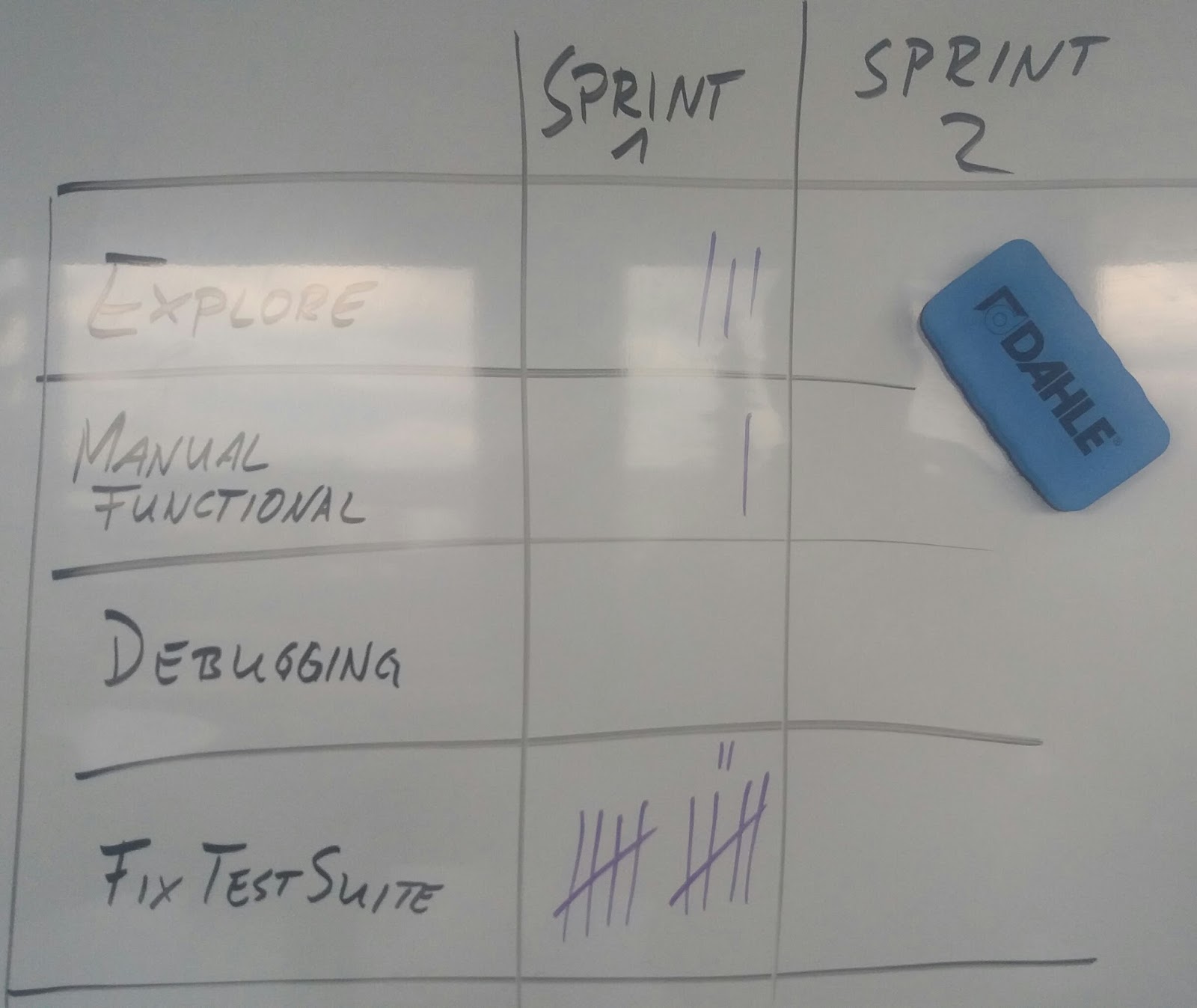
This is an example of how you can track:
Each time your team encounters an issue and spends time with or because of it, make a mark. Your result might then look like this, depending on which activities you are tracking and how you track:

In your retrospectives, you can simply look at the numbers and ask the following questions:
  • Does this make sense?
  • If not: What should we do about this?
  • Will we gain more insight if we get more data in the next iteration?

Summary

"Data Driven Decision Making" is not rocket science. Collecting data can be simple and easy - and require very little preparation or technology. While you may want to refine your collection process depending on your understanding of the problem, the simplest possible solution will often suffice to rule out wasting time on dealing with corner cases or imaginary issues.


Monday, December 14, 2015

How fancy does a Retrospective need to be?

Especially new Scrum Masters might feel compelled to conduct a firework of Special Effects in order to conduct a Retrospective.
Fancy charts, stand-up exercises and highly facilitated techniques abound: An entire website dedicated to methods for facilitating Retrospective invites experimentation.

But how much glitter and glamour does a Retrospective need?

The Pattern: Funnel results

The general approach, as you can also find in the book "Agile Retrospectives", is a five-step approach to create clear results.
1) Set the stage
2) Gather data
3) Generate insight
4) Decide what to do
5) Close the Retro

That's good. But how formal does it need to be?

The Antipattern: Focus on effect, not content

Maybe you feel tempted or compelled to have a clear method for each of these steps, and want to use memorable patterns to guide the team. Here on this link is what the worst nightmare of an antipattern might look like:

Start out with an exercise with a prepared flip chart, continue with another flip chart, go on with another flip chart, proceed with yet more flip charts and conclude with - guess what - another flip chart!
You can now make this completely awkward for everyone by setting up flips with fancy pictures ("visualization") and asking the participants to write post-it's and put them on the appropriate sections of the chart.

Everyone will remember this Retro for certain - but not positively.

Who needs special effects?

Ask yourself one question: "Why would the team want a Special Effect in the Retrospective?" - if you can not answer the question adequately, any effect you are using is most likely waste.

However, if you find many compelling reasons for why the team can not have a good Retrospective without fancy effects, you should lay them out to the team.  Gather feedback to understand if your reasoning is actually just your opinion, or agreed fact within the team.

Hold a Meta-Loop Retrospective

If the team considers retrospectives stale, consider a Meta-Loop Retrospective: "What do you think about our Retros? How can we improve them?"
Maybe the points revealed would go in the direction of "Make more change happen", or "Reduce time investment", or "Better follow-up". Rarely do the points go in the direction of "Fancier effects, please."
Act on the Meta-Loop Retro before planning new effects. Only plan effects that match improvement potential suggested by the team.

Mind your audience

Regardless of what method you use for your Retrospective, please remember whom the Retrospective is for: It is the team.

Usually, the team consists of a wide variety of people. Some are result-oriented, others data-driven, some are silent observers, others active forerunners - just to name a few conflicting constellations.
Any method which specifically entices one character may be a put-down for another. Chances are that the things which sound fancy to an outgoing Scrum Master are not fun at all for an introvert Developer.

When you are conducting a Retrospective, do not think about "Which effects will make this Retro fancy?" - but ask the question "What would the team actually enjoy?".

Simplicity is essential

When you are conducting the first Retrospective with a team, you may be well advised to understand your team and their expectations first. The only thing you need to ensure is that the Retrospective results in viable change action. And then follow up and make it happen.

The best Retrospective may happen by simply having an open, focused discussion. But that depends on your team.

Use the minimum overhead and the minimum amount of facilitation which will give the team a Retrospective meeting their expectation.
You may occasionally use fancy effects to lighten up the mood, but do not rely on them: Any added effect could become a distraction rather than furthering the discussion.

Thursday, September 24, 2015

Done, Done-Done, Done Done-Done?

The "Definition of Done" is a fundamental artifact in Scrum.
It allows the team to decide when they can safely consider their work "Done".

However, many times, team fall into the trap of "Done-Done".
The root cause is usually external dependencies, such as being unable to test software ("Story Done" vs. "Test Done") or a separate Operations team ("Go-Live Done").

At scale, matters quickly worsen: Sprint-Done doesn't mean that there is a Working Release, much less that it has been deployed to Production.

As a first step, the solution is usually to come up with separate definitions of Done.
When describing these, please note that I mean: "First Step" of improvement, not something to be proud of. Having half a dozen of Definitions of Done is a smell, an indicator that something is very, very wrong!

Here are some definitions I have already encountered in the past:

Story Done

The basic activities required to say "We're done with development". Basically, this typically contains fulfilling all Acceptance Criteria, Code Review, Pull Request approved. Ideally, the Acceptance Tests are fully automated as well, although that one is already a compromise in many large organisations.

Sprint Done

The basic activities required to say "We're done with development". Basically, this includes that the Product Owner has accepted all delivered Stories and having merged all Stories into a Green Master.

Test Done

After developers have built "Working Software", it must be deployed and running on an integrated test environment where you can test the interaction with other components and services as well as with real people.
Some parts of the tests that may need to be done include Integration Testing, Performance Testing, Exploratory Testing etc. Just refer to the Test Quadrants to get some ideas of what may be needed.

Deployment Done

After tests are passed, the software must be Up and Running on a Live System. Alternatively, if you are shipping Vendor Software, it means you have a Shippable Product that has gone out to the customer. 

Release Done

 A Release is "Done" when no more activities related to the release are oustanding. Beyond deploying Working Software, it may include automated monitoring and reporting, looking at first figures on the Live Server etc.


The illusion of "Done"

At worst, you end up with a state of Done-Done-Done-Done-Done-"Not Done-Back To Step 1", where faulty stories need to be fixed weeks after they were marked "Done".
As a consequence, old work starts to flow back into current sprints, reducing predictability, velocity and morale.

Oftentimes, companies take this venue because either:
  • There is too much pressure to get something "Done" 
If this is the case, management must be educated that they are sacrificing a high amount of sustainability for an insignificant increase of speed.
Listing the "hidden factory" work that must be done by the team outside of "Story Done" and figuring that into the total cost of delivery may help.
  • They don't know how to do it differently
 From a strategic level, this is easy to fix. Operatively, it requires a lot of organizational change.


Minimize "Definitions of Done"

Team Definition of Done

A "Story" should not be "Done", followed up with additional work to get the "Sprint Done". The first step is to eliminate this gap.
"Story Done" should be attained when there is no more work that the team can do in the sense that from the team's perspective, there is Working Software by the time Story is set to "Done". A story is never "done" unless it is already integrated into the Master and ready to deploy to Production.
Provide a single Definition of Done for the team that includes everything the team can do. Accept no compromise, no intermediary steps.
Other teams can do this, so your team can do it, too!

Organizational Definition of Done

Never take the route of splitting into stuff like "Testing Done", "Release Done", "Deployment Done".
When setting out, catalog all "undone work" which the team does not do that happen before actually bringing the software into production into a single "Organizational DoD" (ODoD).
After creating a catalog, start out by eliminating the obvious waste.
Then comes the tricky part.
Every item on the ODoD should be considered an impediment for story delivery: Anything "urgent" is always blocked by the ODoD.
Depending on your organization, it may take years to move all items from the ODoD towards the team. This should not discourage you from undertaking the journey: Every reduction to the ODoD increases the organization's flexibility and risk of failure in case of emergency.


The Vision of "Done"

There is a single Definition of Done for each team.
The teams act upon this definition and not anything else.

The team can complete all activities necessary to reach Done.
No other party must become active for any item to become Done.

"Done" means "Done".
There is no work left to do when the team moves the card to "Done".

We know it's over.
The risk of failure is already eliminated, so there will be no residual risk of having to undo.


Thursday, May 7, 2015

Agile defect management strategy

"We don't have any defects, so we don't need a defect management strategy".
If you are in that situation, you're fooling yourself. Good teams are not those who don't make any mistakes (that's an illusion!) - they catch their mistakes before any harm is done.
And for that, they have a defect management strategy in place. And that strategy must be continuously inspected and adapted.

The following is a high level outline for an initial agile defect management strategy:

Define: What is a defect?

There's nothing more cumbersome than the discussion whether something is a defect, "Works as designed" or a Change Request. And that discussion does not solve the problem at hand. It's a red herring. You do not want to decide this on a case-by-case basis.
  Align the team and all stakeholders on what you call a "defect" and how to define it. You are free to inspect+adapt the identification criteria frequently. But don't make ad-hoc decisions after getting enraged about individual reports.

How will you track defects?

It doesn't really matter whether you decide to use Post-It's, your Backlog tracking tool or a dedicated application lifecycle management suite. What matters is that you use appropriate means and everyone agrees on the approach.
Issues to consider are: Who needs the information, what will they do with it?

Separate: What is not a defect?

At least as important as the definition of defects is a clear definition of what will not be handled as a defect. This doesn't need to be very formal, specification by example does the job quite nicely.  Typically, issues that are not defects become stories in the Product Backlog and are at the whim of the Product Owner.    
 Some product owners will claim that "as long as it doesn't affect revenue, it's not a defect". We will not discuss here whether that is a good approach. It is merely one of many possible decisions in a project.
 Again, align the team and all stakeholders on what is not a defect and where the dividing line is.

Handle: How will you deal with defects?

It may be obvious to some, but it's not bad to have an open discussion. Depending on the formality and scope of the project, you may want to discuss topics such as severity, priority, SLA's etc. 
Furthermore, you should discuss how you will ensure that the issue is gone once and for all.

Improve: How will you deal with non-defects?

Just because it's a bug doesn't mean the software is doing great. Some "non-defects" are actually improvement suggestions. Others are distractions from the product vision. Yet others are simply a waste of time. While you will need to decide the next steps on a case-by-case basis, you should have a clear strategy on the next steps. After all, your purpose is not to clear the defect list, but to provide a great product that excites customers.

Flakiness: What if you don't know?

Bugs may also be flaky. You may need specific approaches for dealing with the "Bugfoot" (someone is adamant to have seen it, but there is no proof) or the "Heisenbug" (the nature of the bug changes by observing it). The worst thing you can do is sink near-infinite effort into analysis, but you also don't want to disappoint your customers. Claim the common ground.


Conclusion

Invest a bit of time to create a clear defect management strategy. Inspect and adapt your approach whenever necessary. Stay lean and pragmatic. Align.
This will make your agile project much more successful.


Saturday, June 28, 2014

Seven deadly sins of Agile

In theology, a deadly sin is believed to destroy the life of grace and charity within a person and thus creates the threat of eternal damnation. The "seven deadly sins" are not discrete from other sins, but are considered to be the origin of others.

There are a lot of things you can do wrong as an agile organization.
Many impediments are easy to resolve once you are aware. Some, however, may brickwall your team and will sooner or later kill your project - or maybe even your company!

Here is a list of seven potential agile "deadly sins" which can become the root cause of an insurmountable pile of impediments:

1 - Not having any problems

Every organization has problems. In fact, every person has problems: Nobody is perfect.
Not having a keen view for improvement potential will cause the team's velocity to stagnate. Once you stagnate, the first big hitter will devastate your output capacity.
Hyperproductive teams don't get to this stage because they are able to avoid all problems, but because they spot them early and deal with them effectively.

2 - Not tolerting failure

It is nice to work in an environment where everything can be anticipated well in advance. In this case, agile really isn't the best way to go. Reality usually looks different: work includes uncertainty and there is always a looming risk of missing vital information.
Catching such failures fast makes adjustment easy. Hiding small failures will result in big failures.

3 - Lack of trust

If I make a mistake, I can be sure that you will not use it to report my weakness to management, but you will simply correct it - preferably with feedback, so that I may learn for the future.
Unless we are a mutual safety net, catching each other fast and smooth, failure will be painful. And unless we can rely on painless failure, we can't take the risks we must take in order to deliver high value at high velocity.

4 - Pride

Agile thrives when every team member contributes to the best of their ability.
It is OK to have someone who has more ability than the rest, but it should be made that person's primary responsibility to get the rest of the team up to speed. Tolerating any form of primadonna antics will stifle the growth of the team. It will also pose the project at tremendous risk if this person becomes unavailable.

5 - Lack of automation

Doing simple things is often quicker manually than automated.  Unfortunately, a million simple things are still a lot.
Time saved by not automating often comes at the price of decreasing sustainability and future velocity!

6 - Lack of ownership

Agile products become great when everyone on the team cares. A team developing a product "for the product owner" with a low level of engagement will damage or even kill the product in the long term!

7 - Lack of focus

Agile projects become legends when the entire team is focused on delivering one product with maximum value.
It is very easy to lose this focus, for example by diluting the product vision, by overemphasizing internal practices, by having too much turnover in the team. In any case, the result will be a dissatisfied customer.


Friday, May 30, 2014

Wrong assumptions - Take nothing for granted!

As a Product Owner, my primary responsibility is for the "What" of the team, not for the "How".

This week, we had a completely new product and so we formed a new team and did what we always did in projects ...

Communicate the product vision, set up the backlog, define Working Agreements - and get the action on!

We're doing 1-week sprints, because they work very well for our company and those weekly Retrospectives are really valuable.

Anyway. So, we had our Review and the team had done a good job, completed 14 Story Points and done a lot of work that will help them reach a higher velocity later on.

Or, so I thought.

After the Review was over, I casually asked "So, how many unit tests did you write this week?"

... deafening silence ...


Guess what?

The team hadn't had an explicit Working Agreement to write unit tests - and so they didn't!
It's a good thing we have weekly sprints: The Retro will take care of this.

Lesson Learned

Never, ever take anything for granted - you never know who interprets things how!
Better be explicit about the Engineering Practices that will be employed in the project than accumulating technical debt.


Monday, May 26, 2014

Done undone

As a Product Owner, it is my key responsibility is ensuring that the customer is satisfied with the product.

As the SCRUM Team, it is our key responsibility that we get the story "Done" in a way that the customer will also accept.

Recently, I had a bad surprise when running a new team.
We all work for the same company, but we usually don't work together in the same constellation.

So, we dug head in, at the beginning of the sprint, we defined the backlog.
As PO, I defined the stories and priorities. Then, my team did the Work Breakdown and defined the tasks required for each story.

During the Sprint Review, I couldn't accept a single story as "Done", despite the fact that the team assumed the story was done.

What had happened?
The tasks all got done, but nobody paid attention to the story itself! After all tasks were executed, the story was so complicated that even the developers had to ask each other how to use it - UX was terrible!
A customer was present in the Review and he simply asked "How do you expect me to do this?"

Sorry for the team, I couldn't accept it as "Done", because I personally understood "Done" as "We are not going touch this again. We can tear up the story card because everything is finished".

The failure?
I assumed that the team's Definition of Done was the same as mine, but the team had a DoD for themselves which considered a story "Done" if all tasks were completed - not when the results are usable by the customer!

Lesson Learned


Make sure that the Definition of Done is not subjective.
Take your time in the first sprint. Remove all subjectivity and unspoken expectation from the DoD.
Everybody must be on the same boat. The team, the PO and the Customer should all have the same understanding of the team's DoD.
Make certain that before the first story gets implemented, everyone knows and understands the team's DoD in the same way.