Thursday, March 31, 2016

Continuous Integration Flow


Continuous Integration is essential in reaching high-paced, sustainable software development.
Some people think "We have CI" means "We use Jenkins". Well, that's a good start - but it's nowhere near enough. Here is a small infographics to illustrate what CI actually means:


Key activities in CI

Of course, if you start to do everything at once, you will get nowhere.

If you are just taking your first steps with CI, obviously you want to start at stage 1: Checking out the source code repository and producing a build.
Once you got that, you want to be able to put that build somewhere - preferrably, you start with putting it on the Acceptance Test Stage.
Next, you start firing test suites. A unit test suite should exist, others probably still need to be created.

Just work on those items which cause the most pain first and work from there.


Maybe the journey will take you to Continuous Delivery or even Continuous Deployment? Attempting to go there without a good CI is actually suicide.
So, get your CI straight first.

Tuesday, March 29, 2016

What makes a good test?


In agile development, the team is responsible not only for development, but also for testing. However, many developers are challenged with the notion that not just any test is a good test.
Here is a fairly comprehensive list of criteria which good tests meet:


  1. Valid: It measures what it is supposed to measure. It tests what it ought to test.
  2. Clear: Test instruction and test objective should be clear.
  3. Comprehensible: The language of the test should be comprehensible to the reader.
  4. Relevant: It appropriately and accurately covers a significant portion of the Object Under Test. 
  5. Focused: It should do one, and only one thing (“Single Purpose Principle”).
  6. Detailed: Failure conditions should be sufficiently specific to discover the source of the defect. 
  7. Practical: It is easy to conduct and requires a low amount of preparation.
  8. Fast: It should take only an insignificant amount of time.
  9. Efficient: It only consumes a reasonable amount of resources.
  10. Unique: For one specific attribute of the software, there is only one test.
  11. Repeatable: If it is repeated, the result will not differ.
  12. Reproducible: It should yield the same result, regardless of where it is executed.
  13. Independent: It should not rely on the results of other tests.
  14. Economical: It should require lower creation and maintenance efforts than the value of the test (risk covered)


Violation of these criteria may (or may not) be a problem. However, they provide a good guideline when designing tests. regardless of whether these are acceptance, system or component (unit) tests.

Working with the list

When your test process has problems, check a sample of your tests against this list and try to discover hotspots for improvement.

When creating your first couple tests, you should pick some criteria from the list which seem to be the most difficult to achieve. Then design your tests to actually meet these criteria.

Project Managers and Agility

The statement "Now we're agile, we don't need Project Managers any more" - causes fear in those who used to have a PM role and leads organizations to a very difficult question: "What do we do with our Project Managers?" - sometimes, they hastily conclude "Get rid of them". Let us discuss why this conclusion might be too hasty.


The Ugly

Let us examine first what is wrong with Project Management. For brevity sake, we will only list a few points:
  • Gantt Charts presume an organization form that doesn't work in practice
  • Role Separation which presumably increases productivity when all it does is add waste
  • Perverse incentives, such as rewarding testers for finding defects rather than stopping the root cause
  • Watermelon Reporting,  e.g. "we know we're Red, but report Green because that's what management expects" 
In short, Project Managers spend a lot of time setting up a highly wasteful structure and then deceive themselves and the organization that they're doing the right thing.

The Bad

Again, for brevity sake, let us examine briefly what causes the underlying problems in Project Management:
  • The Plan: A project Manager gets paid to make and follow a plan. However, there is always some stuff you can't plan: The elements subject to exploration and/or unpredictable change. 
  • Complexity: People who fail to make the perfect plan aren't imbeciles, because the world is too complex, with a notion of unpredictability sprinkled in: Planning is good, flexibility is better.
  • Detail: Project Manager must work on a certain level of abstraction. Unfortunately, "the devil is in the detail" - i.e. the tricky part can often only be decided by people who are lower in the hierarchy: Only by delegating critical decision authority into the team can a PM succeed.
In short, the world around the Project Manager requires them to do an impossible feat. Only by putting slack ("big gray areas") into the plan and permitting the team to do what they actually should not - i.e. deviating from the plan and breaking the chain of Command - can a project be successful.
As such, the PM role is inherently broken.

The Good

Project Managers do actually bring some skills to the table that are always needed to be successful in an organization. These are:
  • - Organizing: Discipline and doing the right thing at the right time are important for success. Nobody has as much experience in organizaing stuff as the PM. Agile teams find a good organizer very helpful - as long as they don't organize things nobody asked for!
  • Breaking down work: Both backlog refinement and Sprint Planning are work breakdown activities - one on a strategic, the other on a tactical level. Poor work breakdown will result in missed goals and frustrated teams and customers. The only question remaining: How do you do it appropriately?
  • Creating transparency: Status reports are only one way to create transparency. However, the PM is used to creating an appropriate level of transparency. Once they rise beyond the non-valuable metrics, the PM will be very useful to help the team be better understood in the organization.
In short, a PM is very useful for getting the right things done rightly - and helping the team get the necessary credibility in the organization to succeed.

Summary


Whether the organization needs a PM or not - is not a question based on the role of the PM. The PM's skills are needed, while the activity a PM did do in the past are not. A PM may add value to the organization in the roles of Product Owner, Scrum Master / Agile coach or team member. However, the PM must unlearn certain prejudices, notices and abandon practices to rise into their new role. Likewise, they must learn agile practices and adopt a new mindset. A PM who is ready to leave their former title and old behaviours behind will be very valuable to an agile organizations.

Wednesday, March 23, 2016

Reaching Sprint Commitment

The Scrum Primer discusses "Sprint Commitments" as an outcome of the Sprint Planning. This Sprint Commitment means that "the team commits to doing the best they can to reach their target". Often, this is implemented as part of a ceremonious event. The PO asks: "Team, will you commit to this?" - "Yes" - "Go". This, however, is a "Commitment Cargo Cult": It's not how you reach Commitment.

What Commitment is

Based on the "Chicken and Pig" Metaphor, Commitment is an exclusive dedication to a specific purpose.
In Scrum, it is actually desirable that a team exclusively focuses on the specified Sprint Goal. As such, gaining the team's commitment is highly desirable.
However, "exclusive dedication" has a bigger scope than stating to dedicate a couple weeks to a specific topic. Commitment is also a state of mind.

Let us take the example of an Ice Cream Seller at the corner. Maybe he really loves selling ice cream, he enjoys making fancy ice cream cones with perfectly round scoops and some decoration on top. This seller is 100% committed to selling ice cream. His actions are ruled by his love for ice cream.

Now, let's look at the other seller across the street. She is a hired hand, with small children. She, too, sells ice cream as a full time job - but she is actually committed to taking care of her family. Her actions, including the very fact that she is selling ice cream, are ruled by her love for her family.

Both will dedicate 8 hours a day to producing ice cream, and both will strive to sell as much ice cream as possible. But their motive is different. The first seller will continuously think of ways to produce even better ice cream - not because he wants to earn more money, but because he likes to do that. The second seller will spend as little time as possible with ice cream, even during work she will use any free minute to think of their family. She will only think about ice cream sales when the sales are going down (because that affects her directly), but she will not think about new ways of serving ice cream proactively.

We can see very clearly that "commitment" is not really about asking someone to do a certain piece of work, but much deeper.
Developers obviously also have a family life and they have all the right to have this. Let us ignore how much % of their time they spend with work and how much without - but when they work, they should be committed to developing a great product - and not to spend their time doing as much work as possible.

Gaining Commitment

As a Product Owner, you need the team's commitment to plan the next steps.
However, do not ask for a statement of commitment. People might "give commitment" just to get out of a long, boring meeting. They also might "give commitment" because they don't even understand what the problems will be.
You should ask the opposite questions: "What will stop us from reaching this?" - or, "Is there anything that makes you uncomfortable with this goal?"

When developers come up with their own plan for the sprint and do not see road blocks, you can count on their commitment.

Plan Commitment

As a Scrum Team, your responsibility is commitment to a Sprint. 
In Agile Software Development, we never commit to a plan. This is based on the 4th Value of the Agile Manifesto, "Valuing Responding to Change over Following a Plan." What this means: By all means, make a plan, but commit to the goal - not to the plan! Accept that even during the sprint, we may discover information which invalidates the plan.
As team members, when discussing the Sprint Plan, you should not be asking the question, "Can we do all of this?". Much rather, you should ask: "Does it make sense to do this?" - and: "Can I work with this?"

Commitment Culture

As a Scrum Master, your responsibility is that the team is committed.
Your approach to creating commitment should never be focused on method or applying pressure.
Here is a three-stage approach to gaining commitment.

In the first stage, you take the backseat. Do not ask the team to commit - and do not ask the Product Owner to ask for commitment. Observe if the team is actually committed.
During planning, there are a few very good indicators on team commitment. For example, team members who fiddle on their smart phone rather than asking questions are probably not committed.

In the second stage, you move into the passenger seat. After you have a good idea on who is not committed, you must find out the reasons. Taking personal reasons out of the equation, you usually have either organizational or product related issues which impede commitment. Aside from observing closer, you may want to seek the dialogue with people are not committed. Careful - you do not want to suggest they are performing inadequately. You want to find out what could be changed in the organization so that they can commit better.

In the third stage, you must move into the driver seat. Understanding the root causes of lacking commitment, you create transparency around the issue and involve those who can actually do something about it. This may be the Product Owner who is asking the wrong questions to the team - it could be managers giving perverse incentives to developers or just those in charge of existing bullshit processes - or many other things.
Your goal is to change the organization so that developers can commit.

Then, you go back to Stage One - and observe if the situation has improved.

Summary

Sprint Commitment is not a statement during Planning. It is a mindset within the team - and to achieve this mindset, you must have a culture that allows developers to truly commit.
This culture requires a clear goal to orient on (Purpose), developers owning the solution by themselves (Autonomy) - and having what it takes to actually do something meaningful with this goal (Mastery).

You will never gain proper "Sprint Commitment" without this basis.

Tuesday, March 22, 2016

The "Mini Team" Approach to introduce Enterprise Agility

When an organization has decided to "go agile", there is often the question: "How do we do this best?" - unfortunately, since the organization does not yet have agile experience, this is a problem of working in the realm of the "unknown Unknown", i.e. we don't know what we don't know about what we need to know in order to be successful. Since the empirical approach includes learning, this is not problematic if approached properly. 
In this article, I will summarize quickly how we typically approach the first steps with organizational agility in huge, Waterfall-oriented companies. I have dubbed this approach "Mini Team", because it is intended to be minimally complex for maximum effect. The reason for calling this "Mini Team" is because of the huge amount of "Minimums" in setup.

1 - Find a Challenge

The best way to introduce agile ways of working is by actually working on something that is both urgent and important. In the best case, this would be some kind of major crisis or incredible opportunity. The reason why we would want to start with a Challenge is to get everybody's attention that this is important. This concerns workers and management alike.

 2 - Get the right people together as a team

A challenge is usually not mastered by managers, but by people actually doing some work. Consider the following questions: "What are we really trying to do?" - and "What do we need to get that done?". Put together a minimal amount of people who are capable of mastering this challenge. Get the minimal amount of domain experts spanning the biggest possible scope of expertise in regards to the challenge, ideally between 4 and 6.
Do not give these people a manager or team leader, let them self-organize.
We call this "Working with minimum viable skillset".

3 - Free Pass on Processes

The Challenge is set up to imply that "this can't be done with our current organization". As such, the existing processes will most likely be inadequate to master the challenge. We would claim "We don't know what the right process looks like". Therefore, we permit the team to simply ignore existing company processes whenever they do not seem helpful - and take whatever shortcut is helpful to master the challenge.
Do not let them design processes upfront for getting their work done, much rather let the process evolve.
We call this "Working with minimal process."

4 - Apply Scrum principles

Working agile implies being flexible, but some basic Scrum principles should be adhered to: Work iteratively, set goals and plan what you want to do next, collaborate on achieving your goal, reflecting on your progress - and reserving time to think about whether you're still doing the right thing right.
We call this "Working with minimal deviation."

5 - Define a meaningful goal

The Mini Team will not be able to "solve World Hunger" problems, but they can make a significant contribution in a very short timespan. Therefore, the team should not be bogged with a long-term vision or objective, but much rather focus on producing something tangible in a minimum timespan. Since the objective of Mini Teams is both resolving a challenge and getting familiar with an empirical approach to work, a period of no more than 3 months is good. Set a "SMART" goal.
Do not give the team a significant amount of time, like a year or more. Challenge them!
While the goal may or may not be a software or physical product, their target is a "Minimum Viable Product (MVP)."

6 - Discover the solution

Traditional companies often struggle with the notion of not planning the entire journey before taking the first step. However, in the case of our challenge - nobody in the company knows how it can be resolved (otherwise, it would be routine work and no challenge). A specific result may be desired, but nobody knows what the outcome will actually be. Similar to planning a field trip - it's kind of difficult when you know neither where your destination is, nor how to get there. 
Christopher Columbus in the discovery of the New World knew pretty much how long he had to sustain his crew, but not what the journey would bring. The best thing he could do was start to "Sail West". Every once in a while, he observed the Sun and steered back on course. This is what a Mini Team does - decide roughly who will be on the journed to the defined goal for how long, but there is no way to plan the trip. It's an adventure - a journey of discovery!
Abolish long term plans, most of all, resource allocation - since you don't know if it will help.
Instead, plan for short iterations (I suggest: weekly) and check how you must adjust your course.
We call this "Working with minimal upfront design".

7 - Effective Learning

To be successful in the endeavour, it is essential that the team make their own decisions and learns from feedback quickly. Since time is strictly constrained, a seasoned coach/Scrum Master is vital to guide discovery and learning in this learning period. This concerns both within the Mini Team and within the organization. There is no problem with doing something wrong, because nobody in the organization would have known how to do it better.
Accept failure, as long as something new has been learned and action is being taken.
We call this "Minimal feedback cycles".

Summary

A "Mini Team" minimizes organizational and technical constraints in order to deliver a feasible solution to a new challenge. With this, the Mini Team becomes the forerunner to change - where teams answer to challenges every day. The Mini Team can bring traction to agilize an organization - if the challenge was sufficiently significant to be convincing.
The experiences gained in the Mini Team will guide the change efforts of the organization. Therefore, the best way to proceed after the Challenge has been met is by "seeding" the members of the Mini Team into different teams and adopt the same things mentioned in this article there. Take advantage of a "ripple effect" and iteratively set up such "Mini Teams" in your organization to transform an entire organization to agility.

Key benefits of this approach are: 

  1. The most significant challenges in the organization get resolved quickly.
    The organization makes progress!
  2. Within 4 iterations, you could roll out the new way of working to over 1000 people.
    This is a rapid adoption strategy!
  3. During the entire transformation period, you focus on maximizing ROI.
    The adoption itself may already be a positive business case!


Thursday, March 17, 2016

Dealing with Meeting Madness

Meetings run rampant in many organizations. In extreme cases, people hardly have time for focused work because they rush from meeting to meeting. What to do?

Working a lot in the Telco industry, I often jest: "What is the primary characteristic of Telecommunication? - That face to face communication does not work."

This is no offense to Telco and definitely not limited to the Telco industry, but actually a characteristic of many organizations, and IT as a means for communication makes this problem even more profound: It's so easy to schedule a meeting that people put up meetings without even considering whether a meeting makes sense.

Symptom

We often observe people's schedules crammed with meetings. Working as Project Manager for one specific organization, I complained to the CTO that I had thirty six (36) hours of scheduled meetings in my calendar - recurring daily and/or weekly stuff. The reason for the complaint was this: "How do you expect me to give you a meaningful status report when the only thing I'm doing is running from one meeting to the next without actually looking what the teams are doing?"
Long story short: The CTO gave me a blank check to not attend any meeting I didn't consider valuable. Two days later, I was down to 10 hours of scheduled meetings per week and actually started spending time with my teams.

Cause

One cause of Meeting Madness is that ceremonies are not used effectively: When daily standups move from collaboration to reporting, further synchronization meetings become necessary. When plannings are improperly prepared (Refinement/Grooming was not done well) - then multiple planning and clarification meetings become necessary. And so on.
The consequence is that meetings start filling the schedule to the point where people meet, and do not communicate.

Root Cause

In dysfunctional organizations, people focus on two things: Themselves - and their work. Both must look good. Regardless of whether this is the result of perverse incentives provided by management or inherent company culture - it does not help anyone.
People in your organization who care more for "looking good" than for helping out the company in times of need? You've got a staffing problem. 
People feel the need to vindicate themselves rather than solving the issue at hand? You've got a mindset problem!

The Agile way

The most important aspect in communication is considering which information should be conveyed and how that is being received. A general rule is cutting down on complexity as much as possible. Use information radiators to remove the need for "obvious" discussions. Only engage into detailed discussion when they point at something unusual. Do not call meetings whenever you feel they could help: use formal meetings as a last resort. Exhaust small face-to-face discussions, such as during Pair Programming or over a cup of coffee - as preferred methods of communication.
Put every recurring meeting that does not correspond to a Scrum ceremony under scrutiny.

The Scrum way

In Scrum, we should be spending less than 15% of our time in the so-called ceremonies. Scrum does not intend for any other scheduled meetings on top, because the ceremonies should provide enough transparency that no additional planning, reporting, status or coordination meetings are necessary on top. In theory. Many organizations are not there.

Summary

Resolving the meeting madness issue is best done by continuous, scrutinous examination of all the meetings going on in your organization.
Establish a culture where people are welcome to leave ineffective meetings - and at the same time, have the freedom to communicate in whatever way is effective for them.

Try applying Open Space principles to your meetings: 
1 - Don't demand people to come
2 - Don't demand them to stay
3 - Don't demand to fill the entire time
4 - Don't demand to stick to the agenda,
See what happens. The meetings where nobody shows up, stays or talks are probably not important. The meetings where people leave the agenda should make you think.

Monday, March 14, 2016

Is you Kanban board healthy?

Have you ever stood in front of a Kanban board and wondered whether the team is actually doing fine?

Here we will discuss a few key concerns that will easily help you discern whether your Kanban board has problems:

What do you see on your Kanban board?


Broken Priority

When picking up a new piece of work, you should choose the top item on the board which is not yet completed. Sometimes people pick the item they prefer doing - ending up with lower priority items getting done first. The good news is that this becomes visible immediately.
If this happens frequently - or your Kanban board looks more like a dotted map than a flow system, you should seriously raise the question "Why do people not work on the highest priority?"

Unfinished Pile

The objective of Kanban is to get as many things into "Done" as fast as possible, where "Done" means "Delivered to the customer". Unfortunately, a wrong definition of "Customer" (e.g. "The next person down the line") invites team members to simply hand over an unfinished item, and work on yet another unfinished item.
When team members do not pick the rightmost "not done" item on the board, but rather any other, this should lead to the question "What prevents us from getting those things done quickly?"

Broken WIP Limits

Specialists often fall into a habit of simply working off their portion of a backlog item, completely disregarding what happens around them. This may cause an "Inventory" problem: The next step down the line may be clogged, with more and more undone work piling up.
Kanban suggests setting WIP limits on queues and stopping the production of ever more inventory before something new gets started.
Observing WIP limits makes it very easy to recognize when this point is reached. Sometimes, teams ignore this and individual columns on the Kanban start cluttering up. In this case, you should raise the question: "How can we avoid clogging this queue?"

Bottlenecks

Another problem of specialists is that they may be a limited resource in completing a specific step in the delivery workflow. If this is the case, we often observe that this step becomes a bottleneck: Some teams permit a huge WIP limit "because it's normal that a lot of stuff is there". Even worse, some abolish the WIP limit for such a step "because we always break it". A bottleneck should never be taken as irresolvable impediment.
When a bottleneck is observed, the team should be even stricter on setting a very low WIP limit. As this WIP limit is broken, this should trigger the question: "Can we re-organize work so that the bottleneck is resolved?"

Queue Mania

Some teams go crazy on Kanban boards - specifically, on electronic boards. It is very convenient to add a column whenever needed, because people feel it helps them organize their work better. Unfortunately, this fails to consider one underlying problem: Each column represents a queue, and each queue is actually a representation of a handover in the process. Handovers cause delay and are considered wasteful in Lean.
When you observe more columns on your Kanban board than you have fingers on one hand, you should ask: "How can we de-fragment our workflow?"

Summary

Starting Kanban is easy, customizing it is also easy. A Kanban board only visualizes what you are doing. To get real benefit out of Kanban, the layout of the board should continuously be put under scrutiny.
When the board looks unhealthy, the team should "stop and fix", using a Retrospective and define measures for Continuous Improvement. Only then will you get real value from doing Kanban.


Wednesday, March 9, 2016

To estimate or not to estimate - #noestimates by slicing

At the risk of stating something that is already obvious - "#noestimates" does not mean "We don't have any idea what we're building or how much it costs". It means we have simplified the process to a point where risk and reward are in a sound correlation.
There are many ways to reach a state where estimates are no longer relevant. Here, we will discuss Backlog Slicing and its effect on estimation.

One way to remove the need for estimation is to slice deliverables into packages no bigger than 1 single day: At worst, you have lost 1 day and learned that in 1 day.

When you can do this slicing for any given backlog item within a couple minutes, it becomes completely irrelevant whether the slice is actually 1 minute or 8 hours, since the Law of Big Numbers starts to kick in at some point and it becomes fair to say that a deliverable is about 4 hours.

So, even with #noestimates we actually do have an estimate, but we don't bother going through all of the items individually, attaching a "4 hour, could be more or less" label to each and every one of them.

With this information, we can also predict cost and duration:
How many slices do we get out of a "requirement"? 1, 20, 1000? How many of them are really needed?

 Then we optimize: Can we deliver the bulk of the value by doing only a couple of them?

 Lastly, we can quickly observe and act: Do we consistently deliver an about even amount of slices per week? Does the number increase or decrease? Are there any significant outliers that clog the pipeline?
By observing the answer to this question, we imply data without actually measuring it:
As long as the consistent flow of delivery is there and there are no outliers, there is no problem.
On the other hand, when we seem clogged or bogged down, we realize this immediately, because we're not delivering any more.

 This becomes visible and can be fixed within a couple of days, so we can go without a company-wide measuring system that may tell us the obvious by the time the team is already working on a solution - or even worse, waste precious development time by holding the team accountable to solve a problem that we can't influence.


 Summary
#noEstimates is not equal to abolishing good business practice due to negligence or inability.
 Much rather, #noEstimates is a sensible step of evolution for developers who have mastered their technical domain, whose Product Owner is crystal clear on business value and priorities - and for  people with a very rigorous and keen Continuous Improvement mindset.

 A team avoiding Estimates without these three aspects in place may act haphazard.

So, #noEstimates is effectively "Implicit Estimates without explicit estimation overhead".

Tuesday, February 23, 2016

Quantify problems before solving them

I was recently asked: "How many automated tests, do you think, we need?". An underlying premise was that I would provide an expert opinion on whether the team had the right amount of tests.
I could only reply: "I don't know. If you have a problem with quality, you might need more. If you have a problem with the maintenance of your tests, maybe you need fewer. However, if there is no problem, you're probably doing the right thing."

This one can be abstracted, away from the specific issue of test automation.

If there is no problem, there is nothing to fix. But how do you know if you have a problem then?

Here is a simple suggestion:  Collect data. Then, decide based on facts.

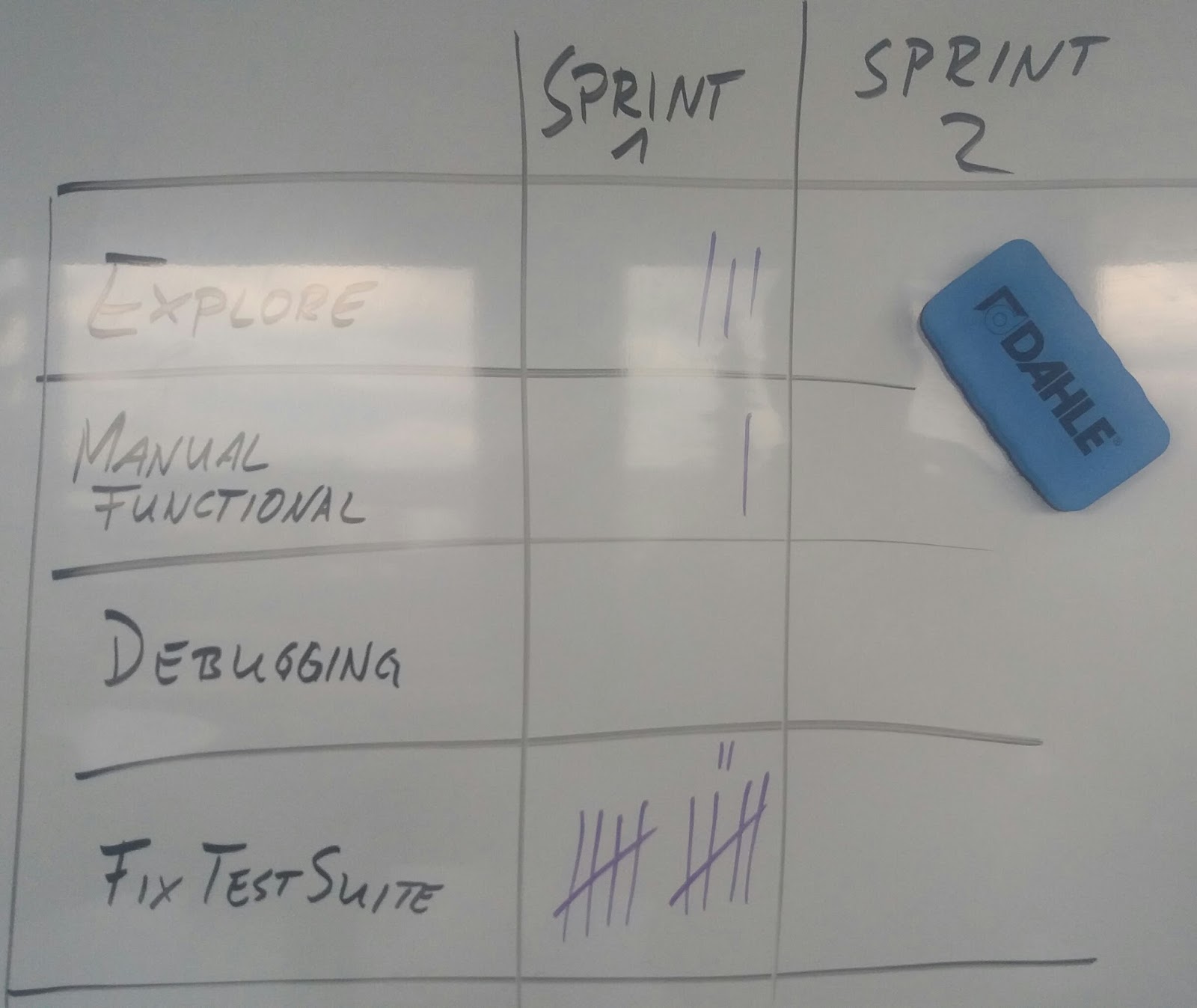
This is an example of how you can track:
Each time your team encounters an issue and spends time with or because of it, make a mark. Your result might then look like this, depending on which activities you are tracking and how you track:

In your retrospectives, you can simply look at the numbers and ask the following questions:
  • Does this make sense?
  • If not: What should we do about this?
  • Will we gain more insight if we get more data in the next iteration?

Summary

"Data Driven Decision Making" is not rocket science. Collecting data can be simple and easy - and require very little preparation or technology. While you may want to refine your collection process depending on your understanding of the problem, the simplest possible solution will often suffice to rule out wasting time on dealing with corner cases or imaginary issues.


Thursday, February 18, 2016

Stakeholder Management 101

In large enterprises, Product Owners often get bombarded with stakeholder requests of all sorts, which they all need to manage. Soon, the poor PO will find themselves juggling requirements rather than advancing the product in the best interest of the companies. Because all of these requirements are important to the person raising them, the PO will quickly become the victim not only of enormous pressure, but also of constant nagging "Why isn't this done yet?"

Here is a simplified request appraisal process for Product Owners to stay ahead of the game:

We won't do it unless the world burns!


Friday, February 12, 2016

Evolving Kanban Boards


Regardless of whether your board is electronic or physical, boards have a huge advantage of making workflows visible and making problems transparent without much overhead.

Here is a real world example of a electronic Kanban board. Let us discuss what this board actually means. As a disclaimer: This is not intended to be a pattern of "how your Kanban board should look like", but "how you could work on your Kanban board". Feel free ignore the detailed contents, because they are irrelevant to our cause in this article.


First thing you may notice: the board is a bit more complex than our usual "toDo, In Progress, Done" board.
This board has evolved over time and it is owned by the team. As such, it does not reflect "how the team should be working", but "how the team is actually working".

A little background

This board belongs to a cross-functional feature team, applying a rigorous Test-First Zero-Defects approach which mandates "no code change without test coverage" and "no deployment with known defects".
Consequently, there is no "In Test" or "Fix" column: Devising the right tests (e.g., "analysis") is as much part of software development as fixing any potentially discovered defects.
When the team moves a backlog item into "Done", it is unconditionally ready to go live.

An evolution journey

As the team discovered that the original 3 columns "ToDo, In Progress, Done" do not provide a sufficient level of transparency to understand at a glance what is actually going on and how they could collaborate, additional columns came in.

The first column that came in was the "to Review" column.
With this, a developer indicated that "My code is ready - from my perspective. I need a code review". Along with the Review column came the Working Agreement to always accept a review before starting a new Work Item. This was intended to minimize inventory.

When a work item was technically complete, the Product Owner inspects the delivered software and determines whether a go-live is a good idea. This may be by discussing with real users, with relevant stakeholders or simply by looking at the software on screen. In some cases, the item is so simple that simply trusting the developers to have completed the Acceptance Criteria is enough.
As the responsibility for this decision rests with the Product Owner, developers move tickets to "Resolved" when they have built Working Software ready for a demo.

The Review process became a bit more complicated, because this team is not  fully autonomous - they are part of a large scaled Scrum organization. Occasionally, the input of members from other teams became essential to maintain Collective Code Ownership. Because such reviews from other teams could take a while, the team created an [in] "Review" column.
The Source Code Management System (in their case, Stash) takes care of managing team external Pull Request reviewers and their feedback - but the ticket sticks "In Review" as long as essential feedback is still missing.

An organization problem sometimes made it impossible to merge fully tested, reviewed code: The Red Master.  Nobody is allowed to merge into a Red Master for any reason other than fixing the broken build - so the team introduced an "Pull Request Open" column to indicate work items that are just waiting to be merged into a Green Master.

Due to not only being a large scaled Scrum organization, but also due to B2B dependencies, the team quickly discovered that sometimes, they would be blocked based on external dependencies. They introduced an "On Hold" column to park any work item which they could not feasibly make progress on because they had to wait for an external party to complete their work. Examples for "on hold" would be, for example, an interface adaption in an external 3rd party software.

After introducing Kanban for a long time, the team encountered a new problem: They could pull work as fast as it arrived. However, not every request that was brought forth to the team makes sense. Any feature and/or information requests were parked on the "Backlog", for the Product Owner to inspect. The Working Agreement became that the Product Owner had responsibility to groom and refine stories in the Backlog before developers would pull them.

Had the PO decided the items would actually be an improvement towards the product vision - and met the team's Definition of Ready, the item would be moved to "Selected for Development". The Team's Working Agreement became that the team completely ignored the "Backlog" column, because it could contain worthless, incomprehensible or conflicting requests - or simply those which were misrouted in the organization.

Conclusion


The specific status model of a team's Kanban board must suit this specific team.
This article is not intended to provide a "better model", but to provide an understanding in the though patterns which can lead teams to evolve their board.

It is generally the best approach to start with a simple board. During Kaizen Events, you might then add columns when inevitable. Working with a complex board and not knowing how (or why) to work with it from the beginning is not a good idea.

This article purposefully omits the steps where workflow columns were added and later discarded because they were found un-necessary. That happens - and is actually good, because it means that people care and Continuous Improvement works.

Wednesday, January 27, 2016

DEEP or SEED backlog?

In Scrum training, we learn that a Product Backlog should be DEEP, i.e., "Detailed Appropriately. Estimated. Emergent. Prioritized."

Consider your backlog as SEED!


However, I personally feel that another acronym might fit better: SEED. As in:

Sorted.
Estimated.
Emergent.
Detailed Appropriately.

That's not really a stretch, because when people say "Prioritized", they explain what we acually do: Not prioritizing, but actually sorting so that there is only one #1 in the list.

The real difference: Mindset

Seeing that SEED and DEEP pose the same requirements towards the backlog, one might argue that there is no difference. The difference would be in the mindset of the Product Owner, not in the Backlog itself.

DEEP: "I need to put deep thought into this, make it really deep." - After doing a detailed planning of the product, we concluded that this is the best way to implement it - which is not what you want from the initial backlog!
 SEED: "It's a seed. Let's see what becomes of it." - the kernel of the seed (Backlog items) have a lot of power and potential, but you can't really predict the future state.

Let us take the example of an acorn. The acorn is a specific type of seed and you can pretty much tell that by growing it, you'll end up with an oak. But you don't know yet whether it will grow at all, whether it will have a split trunk or how much fruit it will yield.

We want a Product Backlog that is brimming full of potential, but we have very little understanding of what we will be seeing in a couple of years.
This makes the Product Owner the gardener of their very own tree (the product), definitely in charge of raising it properly - but not doing everything right now: Let your product grow at a natural pace!

Towards the backlog as a Seed, you can ask the following questions:
  • Can something meaningful grow from this?
  • Do we have the proper conditions to grow this?
  • Given the current state of each item, can we actually grow it?
  • Will we end up with a tree or a mutant jungle when this grows?

Summary

Keeping not only the individual letter items of the acronym, but also the acronym SEED as a whole in mind when setting up or working on your backlog will help you focus on getting meaningful items in there, while keeping useless waste out.

Wednesday, January 20, 2016

Successful Continuous Integration

Continuous Integration is a staple in most organizations these days. Setting up CI is seemingly trivial, given Web instructions and a bit of hardware, any developer can do that in a reasonably short period. However, CI in many organizations is highly dysfunctional, sometimes nobody is aware of the dysfunction - sometimes, it is visible, but the root cause is just out of reach.

Let's take a deeper look at CI:
CI is much more than just a tool!
 Too often, people jump into the solution space too quickly and say "We need a CI tool". That's like saying "We need a car" without even considering where you intend to go: A tool is not a solution unless you define the problem first. For many developers, it's simply a habit, because every good software project these days has CI. But why? Let us start differently.

Process

Let's ignore for a second the seemingly trivial "After a merge, automatically build and run tests, then report failures" aspects of the CI process and dig into the real question "What do we actually expect from our CI process?" - what do you expect from your CI process? That should be, first and foremost, "instant feedback". But: Feedback on what? Based on what feedback you are looking for, you must design your own CI process to give you the most important feedback clearly, quickly and reliably. So, the difficult question becomes "How do we get that?"

Scope

In order to answer the question, "What feedback are we looking for?", we first need to answer the question "What does Integration actually mean?"
Are we trying to integrate:
  • pieces of code into a repository? 
  • features into a system?
  • activities into processes?
  • processes into process chains?
  • components into a larger system?
  • systems into a larger ecosystem?
Depending on what your question is, the feedback you are looking for differs.
Just as an example, let us look at the question "Is our User Account functionality OK?" in comparison to the question "When 10000 users are on our site at the same time, will everyone be served without encountering problems?" - you obviously need a completely different approach to get feedback here.
Before you can answer how you want to get the result, you must define what result you expect and why you need that information.

Test Suite

Once you know what you want and how you want to get it, that obviously just needs to get done. However, it shouldn't just "get done", but it should get done well. Common problems in CI test suites are:
  • Poor coverage, i.e. the information "it passed" is not meaningful
  • Flakiness, i.e. the information "it failed" is not meaningful
  • Interdependence, i.e. the information "27 tests failed" is not meaningful
  • Slow tests, i.e. the information "It finished" is no longer meaningful
Associated with these problems are low value of feedback, high maintenance efforts and productive defects - visible in dissatisfied customers and high cost of development.
Frequently asking "Does our test suite solve the problem we have?" is quite important. While adding tests as needed is easy, both weeding out unnecessary tests and refactoring for optimal information value are often tough calls.

Mindset

The biggest problem with CI in many organizations is that they do not realize that CI is neither a tool nor a process - but a way of working supported by these. Developers do not serve the CI tool and their job is not to keep the master green. As long as developers consider CI a burden rather than a help, then no specific implementation will yield the desirable benefit. Much rather, CI helps developers get their job done well and a red master is an indicator that something is wrong.
Good CI will not only fix a Red Master, but trigger Continuous Improvement [also "CI"] when the Master goes Red: "Why did it turn Red? What can we do to avoid that situation in the future?"
Working on a proper CI mindset goes a long way in successfully implementing CI. A key aspect of this mindset is frequently asking "Which problem are we actually trying to solve with CI? Do we do that?"

Tool

A fool with a tool is still a fool: The tool must be adequate to solve the problem at hand and set up properly to deliver the intended benefit.
Initially, CI tools are empty shells that trigger build jobs and report Pass or Fail. Configuring a source code repo and defining the test suite to execute is done quickly. But you may want to set up individual build chains for different problems, depending on what you are trying to achive. What these chains do, how they interact and what you do with the resulting information is something the tool can not help you with.


Summary

CI supports good software development, but it is not a mandatory component of software development. If your current CI is limited to having an automated build and test job but you've never considered the big picture, chances are you are doing Cargo Cult CI - lots of work for little value. When you see symptoms like developers ignoring Red Master or not even waiting for the CI to complete, you should definitely take a break and do a Retro with the topic: "Let's talk about CI."

Tuesday, January 19, 2016

How SOLID is your code?


Recently, I heard a statement: “We hired a consultancy to make a code review for our team and they said our code has a lot of technical debt, because it is not SOLID.
The SOLID principles (Single Purpose, Open-Closed, Liskov Substitution, Interface Segregation, Dependency Inversion) are five basic principles of Software Engineering. However, there is a reason why they are “principles” and not “laws”.


The small picture: Never “Done”

I will assume for a minute that our team has a DoD stating “Code must be SOLID”. Now, we are in a mess. Suppose I write a mere “Hello World” program. My first draft will have a static main printing “Hello World” to the screen. But that's not Single Purpose: Text and screen output are in one method. Let's separate them. Oh wait – I have another problem now, my print method depends on an implementation of my text method – fixed. Let's add an abstraction layer. Oh wait – we have a problem now. I need to extract the interface. … I think you get the idea. Give me any piece of source code and I can both tell you which principles it violates and also which principles will be violated when you “fix” the violations. But: Where is the value in that? Is our goal to make perfect code or to deliver Customer value? You should be “Done” when the product meets its purpose, not when you think it looks perfect.


The medium picture: SOLID != Clean Code

Let us start by clearing out a basic misunderstanding first. Clean Code is code that is easily comprehensible, easily maintainable and easily adjustable. SOLID is a set of principles to keep in mind to reach this objective. But SOLID is not the only thing you must do.
To make code easily comprehensible, you may need code conventions and syntax checkers – and you will definitely need a well written, readable tests.
To make a product easily maintainable, you need Continuous Integration, not just as a tool, but as a mindset. You should be working on a usually Green Master that is sufficiently robust to give developers rapid, useful feedback. This, of course, requires lots of thought put into your test suite – potentially more than you'd put into your productive code.
To make a product easily adjustable, you need to think not only about your source code, but also about architecture and design. This, in turn, means that you must refactor not only on code level, but also on infrastructure level.


The big picture: Agility

Inexperienced agile teams may be tempted to add “Code is SOLID” to their Definition of Done. While it is a good idea to produce clean code, SOLID is not a desirable purpose in itself. First and foremost, why do we strive for Clean Code? 
Behind Clean Code is the 4th agile value “Responding to Change over following a plan”. At the same time, you have the 1st Agile Principle: “Our highest priority is to satisfy the customer through early and continuous delivery of valuable software” and 10th Agile principle: “Simplicity – the art of minimizing the amount of work done – is essential!” Clean Code has the objective of making code easily workable, with the goal of creating a flexible product that can be adjusted incrementally without ever slowing down in pace. To reach this objective, we must be able to minimize the effects of change. This requires changes to be elementary and good automated test coverage. And this is where SOLID comes into play: When you need to invest a lot of effort, either into making the change itself or validating that change, your code is not good. SOLID gives you a simple set of rules, not only how to add a change, but how to structure your code so that you can change it later.
Agility neither advocates keeping SOLID principles nor disregarding them. Much rather, SOLID is a tool to minimize overall work done – both now, and in the future. When you know with a high amount of certainty that the amount of work you will invest on a piece of code in the future is lower than the amount of work you would invest into SOLIDifying your code now – then don't. That's not in the spirit of agile software development, because SOLID is not a customer value: Working software is.


Summary

Whenever you make a change to the code, you should make this change in a fashion that will not purposefully reduce the quality of your code, and that means: Future comprehensibility, maintainability and adaptability should not deteriorate below their current stage. When changing code, think about refactoring before you leave.
In refactoring, remember: Minimize the total amount of work done. Do not apply “SOLID” when it's simply a waste of effort. On the other hand, apply SOLID when you know for certain that you will get back to a code segment.

Tuesday, January 12, 2016

Three things a good Scrum developer brings

It's usually not about how many years you have worked in Software Development, not about how excellent you are in a specific discipline - although it certainly helps, it may occasionally be detrimental. That is the case when a developer's history makes it impossible for them to move forward.

Here are the three things which make a good Scrum developer:

1 - Engineering Practice
Mastery in Engineering Practice is very hard to achieve - but if you don't even have these as basics, everything you produce will most likely cause more problems than it helps: Technical debt is much harder to manage than avoiding.
Getting the basics down on these only takes a couple days - getting the practices on a value adding level takes a fairly long time.
Think, among others, of:
Emergent Design - The art of designing your code so that you are never maneuvered into a corner where you can't meet a reasonable customer request due to technical constraints.
Sustainable Test - Moving from simply writing unit or behaviour tests to the level of testing the right thing, the right way, to get meaningful feedback at minimal cost - while equally avoiding the pitfalls of flaky tests and constant test rework.
Clean Code - Applying SOLID principles "just enough" to end up with easy-to-understand, well-tested, robust code that does not rely on heavy documentation and is easy to work with.
Refactoring - Tweaking the code just at the right time to make it fit for the current purpose without breaking anything.

2 - Lean Thinking
Your horizon must extend far beyond the Software level, Keep Lean's "Optimize the Whole" in your head. You must grow your product, avoid waste, eliminate "work to do", simplify processes, keep customers happy and your organization profitable. At the same time, you don't want to get stressed - and to focus: Quite a feat. Can you properly apply these to your work?
Value - Discriminating "what is asked" from "what is useful".
Value Streams - Discerning the easiest way to get from customer need to customer satisfaction.
Flow - Slicing down the work, avoiding BUFDs and Big Bangs.
Pull - Leaving the tiresome treadmill of featuritis, moving towards sustainable pace without losing business opportunities.
Perfection - Never being content with "good enough", while at the same time avoiding the waste of "gold plating".

3 - Agile mindset
A key pillar of agility is the Inspect and Adapt mechanism. Regardless of how professional you are, you're probably not a prestidigitator. How well do you do in this arena?
We don't know - There are many things we don't know. Some things we know that we don't know, and other things we don't know that we don't know.
We must learn -  We must continually strive to learn and incorporate our learning into our approach and behaviour. We must accept that yesterday's "right" may be today's "wrong".
We must collaborate - No one person can know or do it all. Only by collaboration can we attain the best possible outcome. This collaboration includes developers, business people and customers alike.


Summary

Being a good Scrum developer requires much more than being a good programmer. The mindset change and learning required to grow into this role may require quite some time, but it's a road definitely worth taking.
Of course, understanding your delivery framework, such as in this case, Scrum, is also advised, but that's probably the easiest part to pick up.